What if your Ruby app could think, learn new skills at runtime, and tell you exactly what it’s doing – all in a single terminal line ?
TL;DR: Code on GitHub 🚀 | Demo: Watch TUI Video MP4 🎬

Introduction
When Guillaume Laforge built the unofficial Antigravity SDK for ☕️ Java (and documented it in ✍️ his article ) back in July, I thought: “If ☕️ Java gets one, Ruby deserves one too.” So I built one. And then I built a Telegram bot on top of it. And then the bot learned to discover and load skills at runtime. And then I needed to debug why the model kept going silent after exactly 7 WebSocket messages.
This is that story.
The Antigravity Ruby SDK is an unofficial Ruby wrapper around Google’s Antigravity harness – the same engine that powers Gemini CLI, Antigravity IDE, and Antigravity 2.0. By connecting it to Telegram and the Telegram Bot API, it gives your code access to Gemini’s full agentic capabilities: tool calling, skill loading, streaming responses, and now, a generic event system for real-time observability right inside your chat window.
How It Works
The architecture is deliberately simple. Your Ruby process talks to a local Go binary (the “harness”) over WebSocket. The harness handles the heavy lifting: authentication, model communication, tool execution, and safety policies. Your SDK just needs to speak JSON.
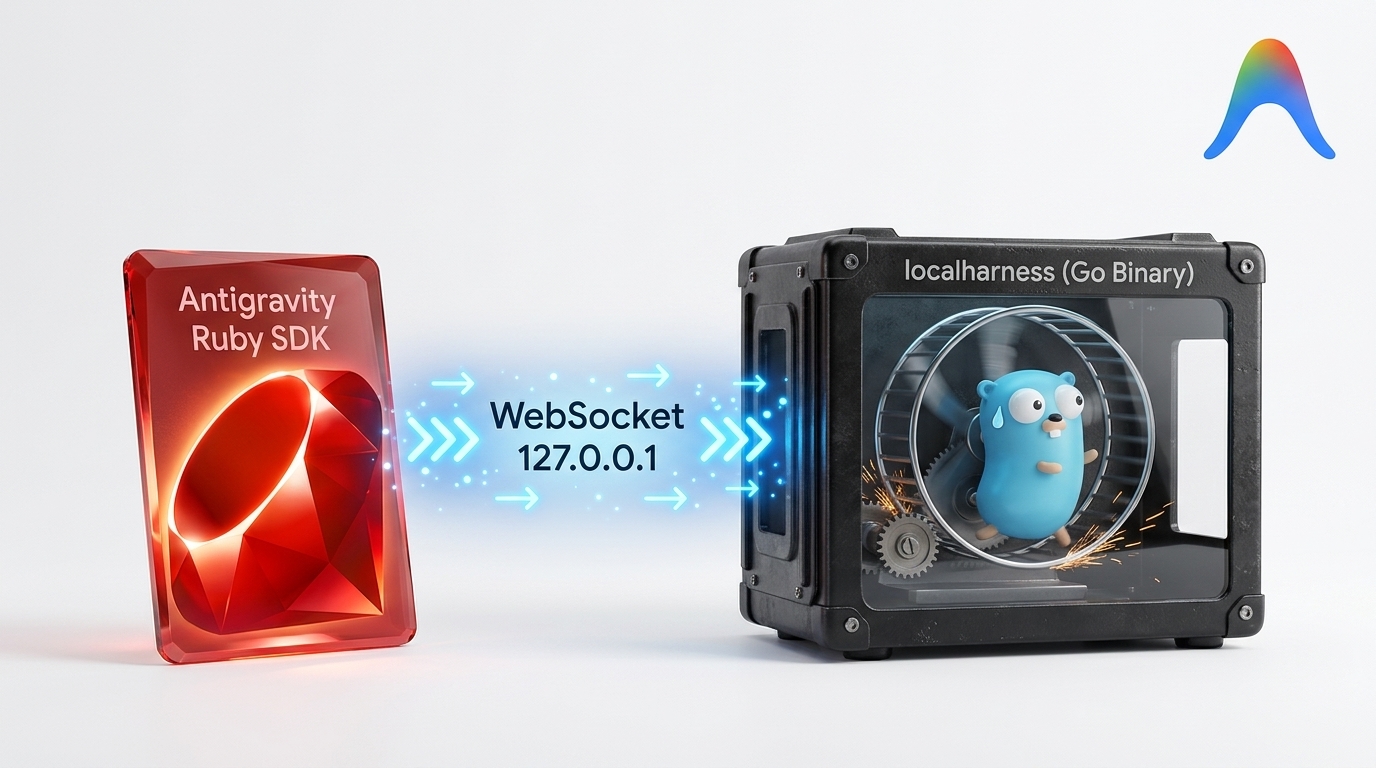
| |
graph LR
    U[User 📱] -->|message| T[Telegram API]
    T -->|webhook| B[Ruby Bot 💎]
    B -->|ask| SDK[Antigravity SDK]
    SDK -->|WebSocket| H[Harness 🔧]
    H -->|API| G[Gemini ✨]
    SDK -.->|load| SK[Skills 📚]
    SDK -.->|subscribe| HK[Hooks 🎣]
    SDK -.->|register| TL[Tools 🛠️]
Getting Started: 5 Lines to Your First Agent
| |
That’s it. The SDK spawns the harness, opens a WebSocket, sends your prompt, streams the response, and returns the full text. Under the hood, about 2000 lines of Ruby handle connection management, session lifecycle, tool routing, skill resolution, and structured logging.
Building a Telegram Bot
The real fun starts when you connect the SDK to a messaging platform. Here’s the core loop of our Telegram bot:
| |
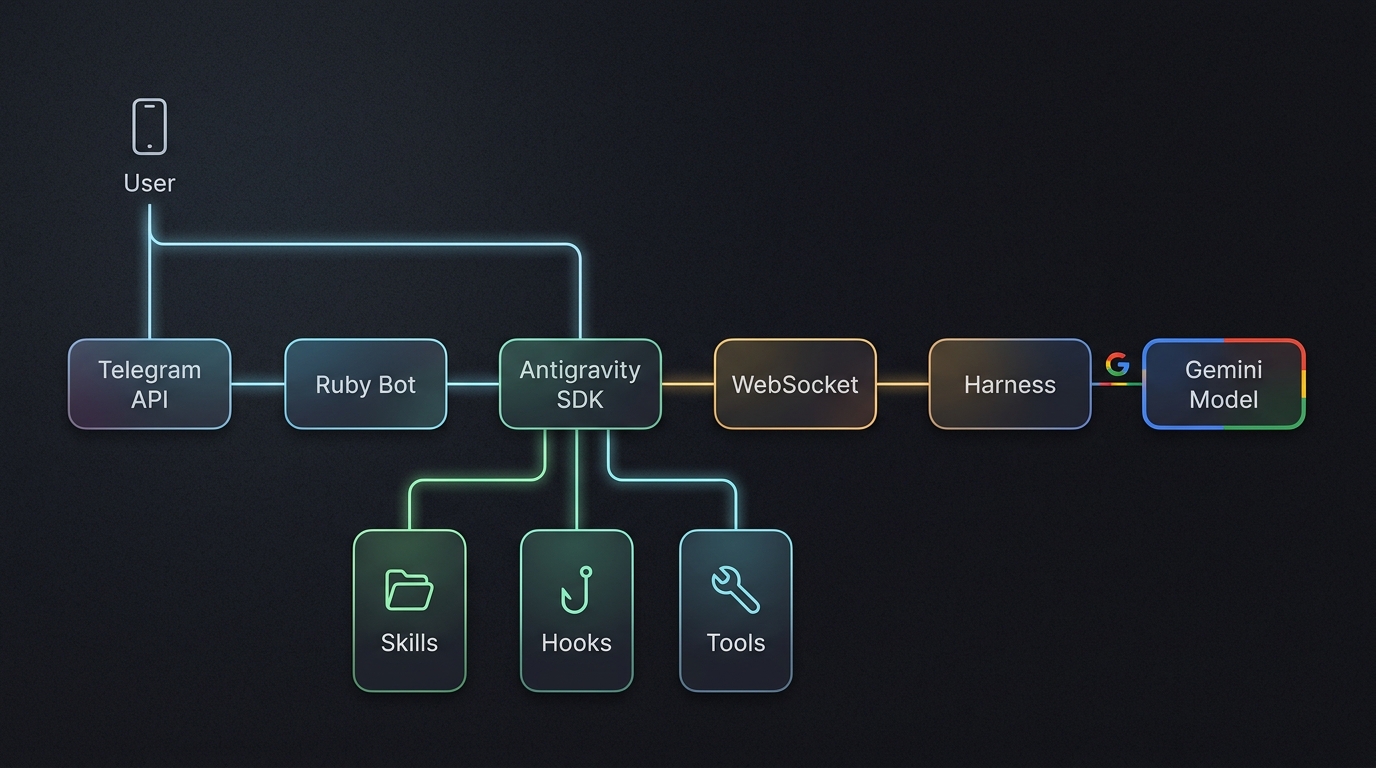
Each Telegram chat gets its own ChatSession with its own Antigravity agent. The agent starts with a “metaskill” – a skill that knows how to find and load other skills. Users can ask the bot to learn new capabilities on the fly:
User: Find the riccardo-todo skill
Bot: Foundriccardo-todoat/path/to/skills/riccardo-todo
User: Load it
Bot: [dynamically loads skill in active session] Loaded! I now know about your to-do list.
User: Where’s my to-do file?
Bot: According to the skill, it’s at~/obsidian/TODOs/TODOz.md
Want to speak instead of type? You can send voice notes directly over Telegram. I’ve tested the SDK with Italian and English audio notes and it works great! You just need to add this to your .env:
# See .env.dist for more info
TELEGRAM_BOT_TOKEN="<YOUR_BOT_TOKEN>"
TELEGRAM_CHAT_ID=<YOUR_CHAT_ID>
# [optional] Needed for Speech-to-Text translation, emojis are on us.
GEMINI_API_KEY=<your-api-key-here>
Here’s how it looks on my phone:
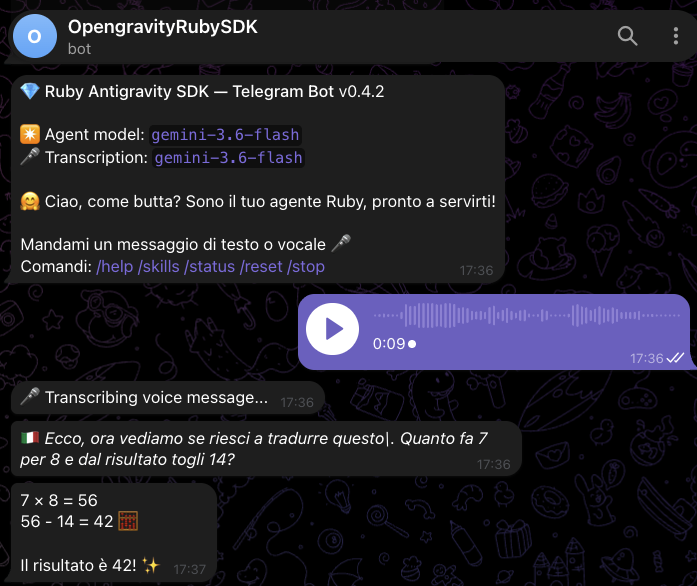
I think you can figure out the math even if you don’t speak Italian!
Skills: Superpowers for Your Agent
Skills are the Agent Skills
standard – a SKILL.md file with YAML frontmatter and markdown instructions. The SDK supports:
| |
The runtime loading now attempts dynamic skill loading within the same session. If the model struggles to invoke the new skill, we fall back to a manual failsafe that reads the skill definition and executes it directly.
Personally, I enable at startup a single meta-skill for skill discovery based on my skills Ruby script agc
(like npx skills but better).
Wanna try it? Just type this:
| |
My friend André Arko
will be so happy to see I’m finally using rv
(yes, it’s the Ruby version of Astral uv, but faster!)
The Hooks System: 3 Lines That Changed Everything
This is where Ruby shines. We needed debug observability for the WebSocket traffic, but didn’t want to pollute the core Conversation class. The solution: a generic pub/sub event system.
The entire core change:
| |
Here is the sequence of events when a message arrives:
sequenceDiagram
    participant WS as WebSocket
    participant Conv as Conversation
    participant Hooks as Hooks
    participant TUI as TUI Status

    WS->>Conv: message (JSON)
    Conv->>Hooks: emit(:ws_message, msg)
    Hooks->>TUI: callback fires
    TUI->>Terminal: print "\r\e[K🏃 running 💭 ⏳42s"
That’s it. Three lines in the SDK. Everything else lives in the consumer:
| |
Instrumenting the TUI was never this easy! Decorate this, Python! :)
Zero lines of debug code in the core SDK. All observability is opt-in, external, and composable. This is the Ruby way.
The Dynamic TUI Status Line
The hooks system’s first real consumer was a dynamic terminal status line for our E2E test suite. By pairing a background ticker thread with ANSI carriage returns (\r\e[K) and state emojis (🏃, 😴, 🛑, ⏳), the terminal overwrites a single status line in-place on every event:
The result: you ALWAYS know what the agent is doing in real time:
- Thinking? You see
💭💭💭. - Calling tools? You see
🔧 Find todo files. - Stuck? The live timer keeps ticking:
⏳42s... ⏳43s... ⏳44s...
Debugging a Model Hang: A War Story
With the TUI in place, we caught a fascinating bug. When loading a new skill dynamically in Phase 3 of our E2E test, the model would sometimes hang – every single time, with the exact same pattern:
     🏃 running 💭💭💭💭💭 ⏳2s 7↕
     🏃 running 💭💭💭💭💭 ⏳3s 7↕
     ...
     🏃 running 💭💭💭💭💭 ⏳59s 7↕
  ⚠️  Error: Wall-clock timeout after 60s
The model sent exactly 5 thinking deltas at the 2-second mark, then went completely silent. No DONE, no FULLY_IDLE, no error – just nothing.
Here is the sequence of states in the E2E test pipeline and where the model could hang:
graph TD
    P0[Phase 0: Sanity] -->|✅| P1[Phase 1: Connect]
    P1 -->|✅| P2[Phase 2: Find Skills]
    P2 -->|✅| P3[Phase 3: Load Skill]
    P3 -->|restart| P4[Phase 4: Use Skill]
    P4 -->|💀 HANG| RETRY{Retry?}
    RETRY -->|attempt 2| P4
    RETRY -->|attempt 3| P4
    RETRY -->|give up| FAIL[❌ Known Bug #16]
What we learned the hard way
Large tool results cause “thinking hangs”. Our
load_skilltool was originally returning the entireSKILL.mdcontent. This massive context dump overwhelmed the model, causing it to spin its wheels indefinitely. By optimizing the tool to return a concise 4-line summary (name, script path, description, usage hint), the model processed it instantly.Failsafes are better than session restarts. We used to restart the entire session when loading a skill to ensure the model recognized it. Now, we use dynamic skill loading in the same session. If the model still times out in Phase 4 (acting on the new skill), our harness kicks in with a manual failsafe: it reads the
SKILL.mdand builds theuv runcommand directly, bypassing the agent loop entirely.Idle timeout != wall-clock timeout. The SDK’s
timeout:parameter is a per-message idle timeout. If the model keeps sending tool calls, each response resets the timer. We addedTimeout.timeout()as a hard wall-clock deadline.
With these improvements, all 9 E2E tests now pass consistently in around 73 seconds. This bug and its resolution are tracked in Issue #16 .
Ruby Idioms for Agent Code
A few Ruby-native patterns that proved invaluable for building agentic apps:
- Tool Result Hygiene: Keep tool responses concise. Models struggle with large, unstructured text dumps, so return only essential metadata to prevent thinking hangs.
- Guaranteed Cleanup with
ensure:
| |
- Ruby 3 Endless Methods for Terminal Color Oneliners:
| |
What’s Next
The Antigravity Ruby SDK is at v0.5.0 with all 9 E2E tests passing consistently. Here’s what’s coming:
| Feature | Status | Issue |
|---|---|---|
| Mid-session skill loading | Shipped | #15 |
| Policy engine | Shipped v0.5.0 | #21 |
| MCP server support | Planning | – |
| Channel abstraction (Telegram/WhatsApp/Discord) | Planning | – |
| Protobuf handshake | Backlog | – |
| Rails integration | P4 Vision | – |
And about that policy engine… It is now shipped in v0.5.0! 🎉
Declarative Policy Engine
Any language can define a good policy engine. Only Ruby, I might argue, can define a beautiful policy engine DSL. And Antigravity is the best partner in crime for this design!
Check out how expressive, clean, and idiomatic it looks in actual Ruby code:
| |
How does Issue #21 (Policy Engine DSL) look, my friends?
See the Policy Engine in action, from our interactive Richard console:
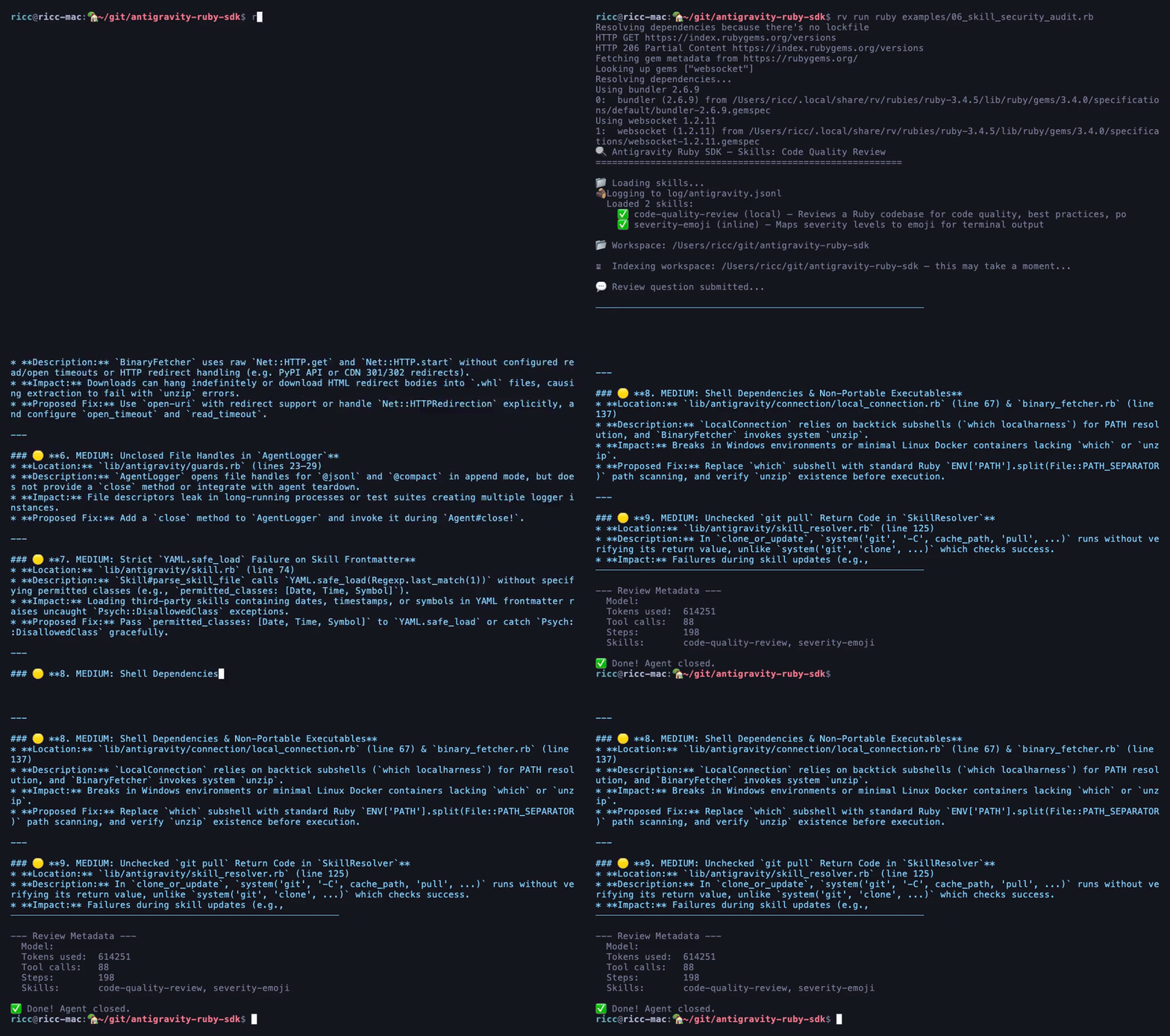
Dynamic Policy Injection
Policies aren’t just static. You can inject rules at runtime – perfect for hardening your agent mid-session:
| |
This is Ruby’s killer feature for agent safety: policies are objects, not config files. You can compose, inherit, and mutate them like any Ruby object.
Your Turn
The Antigravity Ruby SDK
is open source and ready for experimentation! You can install it directly via the antigravity-sdk gem on RubyGems
(published with 5K downloads already! 💎) or clone the repository:
| |
I’m genuinely curious how you’d use this. Would you build a Slack bot? A Rails assistant? A CLI tool that learns from your codebase? Open an issue, send a PR, or just say hello.
I’m currently looking for interesting use cases for pre/post hooks and sidecars. If you have a neat use case, let me know: I might build it for you!
And if you want to see what Guillaume built for Java, check out ✍️ his article – it’s the post that started this whole Ruby adventure.
The Antigravity Ruby SDK is an unofficial, community project. It is not an official Google product. But God this is good!
📝 This article will also be published on Medium — link coming soon.